

Rippling
Connect Rippling: read-only OAuth, the work metadata Noru reads about people, devices and app accounts, the evidence and findings it produces, and the personal data it never stores.
- Authentication
- OAuth
- Categories
- HR, IAM
- Sync cadence
- Daily by default (hourly, weekly, or monthly on request)
- Requested access
companies.readworkers.readdepartments.reademployment-types.readapp-users.readdevices.read
Rippling is an HR source of record that also manages devices and app accounts. Noru reads work metadata from all three to evidence joiners, movers and leavers, device encryption and management, and who holds an account in each app Rippling manages. It reads no personal data beyond a work email.
Rippling is in limited availability. Ask your Noru contact to turn it on for your organization; until then it does not appear in the connect dialog.
What Noru collects
| Object | Source call | Fields kept | What it feeds |
|---|---|---|---|
| Company | GET /companies | Id and name | Binds the connection to one Rippling company |
| Workers | GET /workers | Id, work email, status, title and its effective date, department, employment type (employee or contractor), manager, start date, end date | People directory, roster, joiner, role-change and leaver evidence |
| Departments | GET /departments | Id, name, parent department | Department labels and the organization structure |
| Employment types | GET /employment-types | Id and type | Employee and contractor counts |
| Devices | GET /devices | Serial number, platform, model, operating system and version, enrollment state, MDM provider, managed, encrypted, last check-in, assigned worker | Assets, device inventory, encryption and management evidence |
| App accounts | GET /app-users | App name, assigned worker, match and push state | App access inventory, leaver evidence, vendor access reviews |
Every response is reduced to the fields above as it is read; nothing else from a record is stored or logged. Devices and app accounts need Rippling IT and app management. Without them, or without the scope, Noru skips those records and the rest of the sync still runs.
What Noru does not collect
- Names. Noru does not request
users.read, which would also return home addresses and phone numbers, so people keep the name another source or a manual edit gave them. - Date of birth, gender, race, ethnicity or citizenship, even where Rippling includes them in a worker record.
- Personal email, home address or phone numbers.
- Compensation, pay schedule, tax identifiers, social security numbers or bank details. Their scopes are never requested.
- Termination reasons and custom fields.
- The username or email a person uses inside each app. The link to the worker is enough to say who holds the account.
- Company legal name, tax id, address or phone.
- Noru never writes to Rippling.
Before you connect
- A Rippling admin who can install apps from the Rippling App Shop. Rippling shows the permissions above and the admin approves them.
- Rippling IT for device evidence and Rippling app management for app account evidence. HR evidence works without either.
- Decide who owns department and title data. Rippling, like HaileyHR, overrides identity providers (above Entra ID, which is above Google Workspace); only manual edits in the People directory rank higher.
- Each Rippling company can be connected to one Noru organization only.
Connect
/data-sources and click Connect data source.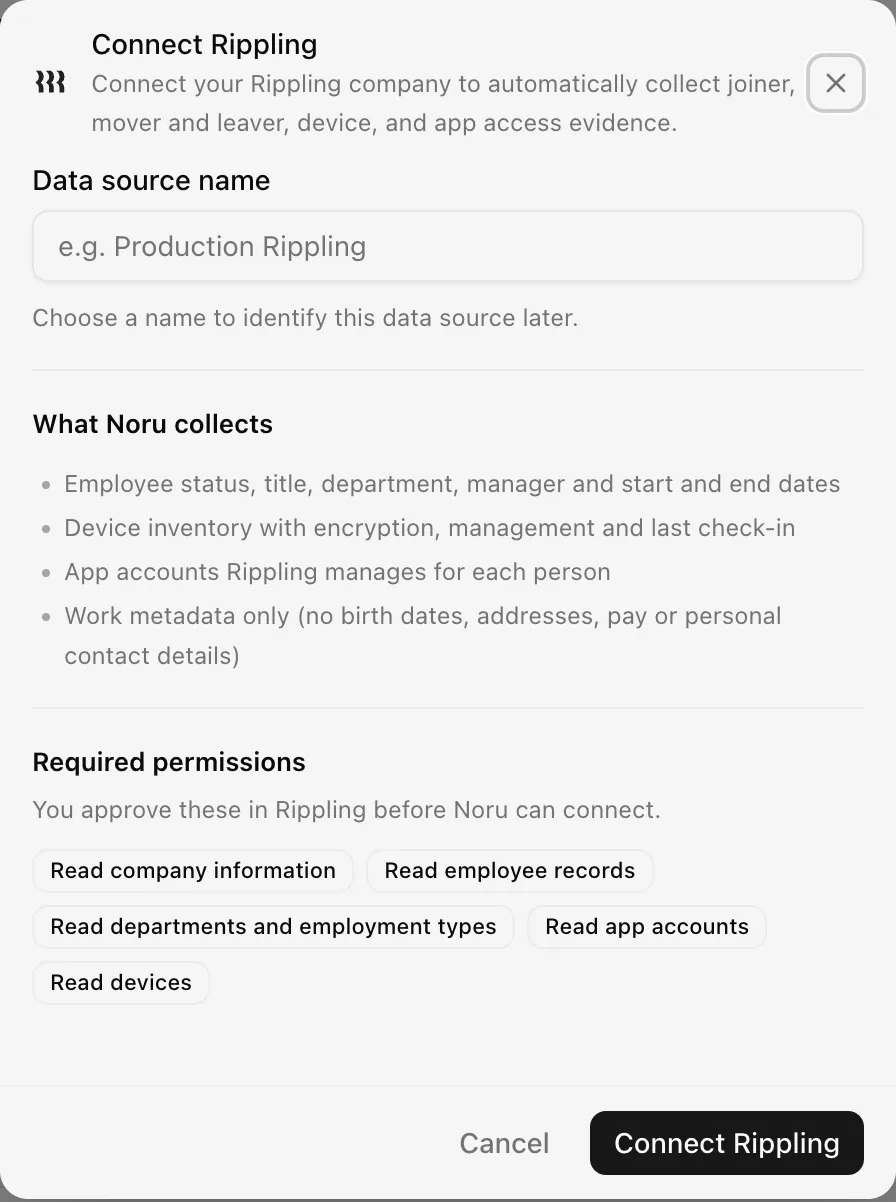
Allow pop-ups for Noru if the Rippling window does not open. See Naming and using connection dialogs for naming, scrolling, and closing behavior.
If you start the install from the Rippling App Shop instead, Rippling sends you back to Noru's connect dialog. Finish the connection from there so Noru knows which organization it belongs to.
The first sync starts shortly after you connect and then runs daily. Use Sync now on the source to run one sooner.
After connecting
- People directory. Each worker with a work email becomes a person, or is matched to an existing one by email. Active, hired and accepted workers count as active; terminated workers as inactive; draft records are skipped. If Rippling says someone has left while an identity provider still has them active, the person shows as Inconsistent and a cross-source status finding is raised. See People sources and precedence for how statuses from several sources combine.
- Department and title come from Rippling and take precedence over identity providers. Rippling never changes a person's name, groups or MFA. The person's manager, employment type and start and end dates are kept with their Rippling record.
- Assets. Each device becomes a hardware asset owned by the worker it is assigned to. A device counts as compliant when it is managed, encrypted and has checked in within the last 30 days.
- Vendor access. Each app account links the person to the vendor of the same name in your register, so the vendor's access review lists who holds an account. An app with no matching vendor is added to the register as a discovered, not yet assessed vendor, unless you dismissed or deleted it before. Rippling itself is not offered as a system in access reviews: it reports no roles, sign-ins or MFA.
- Evidence and controls. Each record maps only to control and evidence pairs from Noru's control catalog:
| Evidence | Content | Controls |
|---|---|---|
| Rippling Workforce Roster | Counts by status, employment type and department; the department tree; who has a manager | PS-08 Human Resources Security Management (Organization Chart) |
| Rippling Joiners | People who started in the last 90 days, with the number of app accounts provisioned | IAM-01 Logical Access Provisioning (Access Provisioning Logs) |
| Rippling Role Changes | Title changes in the last 90 days with their effective dates | IAM-10 Role Change: People Resources Notification (Access Modification Logs) |
| Rippling Leavers & Offboarding | People who left in the last 90 days, the app accounts still linked to them and the devices still assigned | IAM-03 Logical Access De-provisioning (Access De-Provisioning Logs); IAM-04 Logical Access De-provisioning: Notification (Access Termination Logs); PR-04 Organization Property Collection (Termination Process Evidence for sample employees); IAM-50 Termination of Employment and PS-31 Asset Collection (Deprovisioning Checklist) |
| Rippling App Access Inventory | Per app, how many accounts are assigned and matched; per person, the apps they hold | AM-02 Inventory Management: Applications (Asset Inventory); IAM-42 User & Service Account Inventories (User & Service Inventory) |
| Rippling Device Inventory | Every device with its owner and enrollment state | AM-01 Inventory Management (Asset Inventory); MDM-01 Mobile Device Enrollment (List of all mobile devices registered with MDM tool) |
| Rippling Device Encryption | Encrypted and unencrypted devices | MDM-02 Mobile Device Encryption |
| Rippling Device Management | Managed devices, MDM provider and devices that have not checked in for 30 days | MDM-03 Configuration Management: Mobile Devices |
-
Findings.
- Former employees still have app accounts (high).
- Former employees still have company devices assigned (medium).
- Devices are not encrypted (high).
- Devices are unmanaged or have not checked in for 30 days (medium).
- Employees are leaving within 30 days (low).
Each finding is re-evaluated on every sync and closes on its own once the condition is gone.
How each record is decided
| Record | Counted when |
|---|---|
| Joiner | The start date is in the last 90 days and the worker is not a draft |
| Role change | The title's effective date is in the last 90 days, differs from the start date, and the worker has not left |
| Leaver | The worker is terminated and the end date is in the last 90 days |
| Upcoming leaver | The worker is not terminated and the end date is in the next 30 days |
| App account still linked | Rippling has matched the account to the person in the app; unmatched accounts are counted but not linked |
| Device still assigned | The device is assigned to a terminated worker |
| Compliant device | Managed, encrypted, and checked in within the last 30 days |
| Stale device | No check-in for more than 30 days, or never |
Rippling does not report screen lock, firewall, MFA, admin roles or background checks through its API, so those controls need other evidence.
Permissions in detail
| Scope | Why Noru asks | What it could technically allow |
|---|---|---|
companies.read | Bind the connection to one Rippling company | Company legal name, tax id, address and phone. Noru keeps the id and name |
workers.read | Status, title, department, manager and employment dates | Any worker field the approving admin can see, including date of birth and personal email. Noru drops everything outside the list above |
departments.read | Department names and the department tree | Department reference codes |
employment-types.read | Employee or contractor | Pay period fields of an employment type |
app-users.read | Who holds an account in each managed app | The username and email used inside each app. Noru keeps neither |
devices.read | Device inventory, encryption, management and check-in | Nothing beyond the device record |
Rippling issues the tokens to Noru's partner app. They are encrypted at rest with a key held by Noru and refreshed before they expire. Uninstall the Noru app in Rippling to cut access immediately.
Troubleshooting
| Symptom | Cause and fix |
|---|---|
| Rippling is not in the connect dialog | Rippling is in limited availability. Ask your Noru contact to turn it on |
| "This Rippling company is already connected to another Noru organization." | Each Rippling company connects to one Noru organization. Disconnect it there first |
| "This Rippling company is already connected. Use Reauthenticate on the existing connection instead." | Your organization already has this Rippling company connected. Reauthenticate that connection rather than adding a second one |
| "This Rippling authorization has expired. Please try again." | The approval took longer than ten minutes or the window was reused. Start again from Connect Rippling |
| The source shows Disconnected | Rippling refused the stored authorization, usually after the app was uninstalled. Click Reauthenticate and approve again with an admin of the same Rippling company |
| No device or app evidence | The company does not use Rippling IT or app management, or the scope was not granted. HR evidence is unaffected |
| A person shows their email instead of a name | Noru does not read names from Rippling. Connect an identity provider or edit the name in the People directory |
| Role or department differs from Entra ID or Google Workspace | Rippling wins by precedence. Edit the person manually if Rippling is wrong |
Related
- How syncs run
- Permissions and security
- Troubleshooting data sources
- People directory
- People sources and precedence
- User access reviews (UARs)
- HaileyHR, the other HR source of record
Last updated on