

Create and edit risks
Assess a risk with the full form, generate treatment suggestions, and record residual risk.
What it is
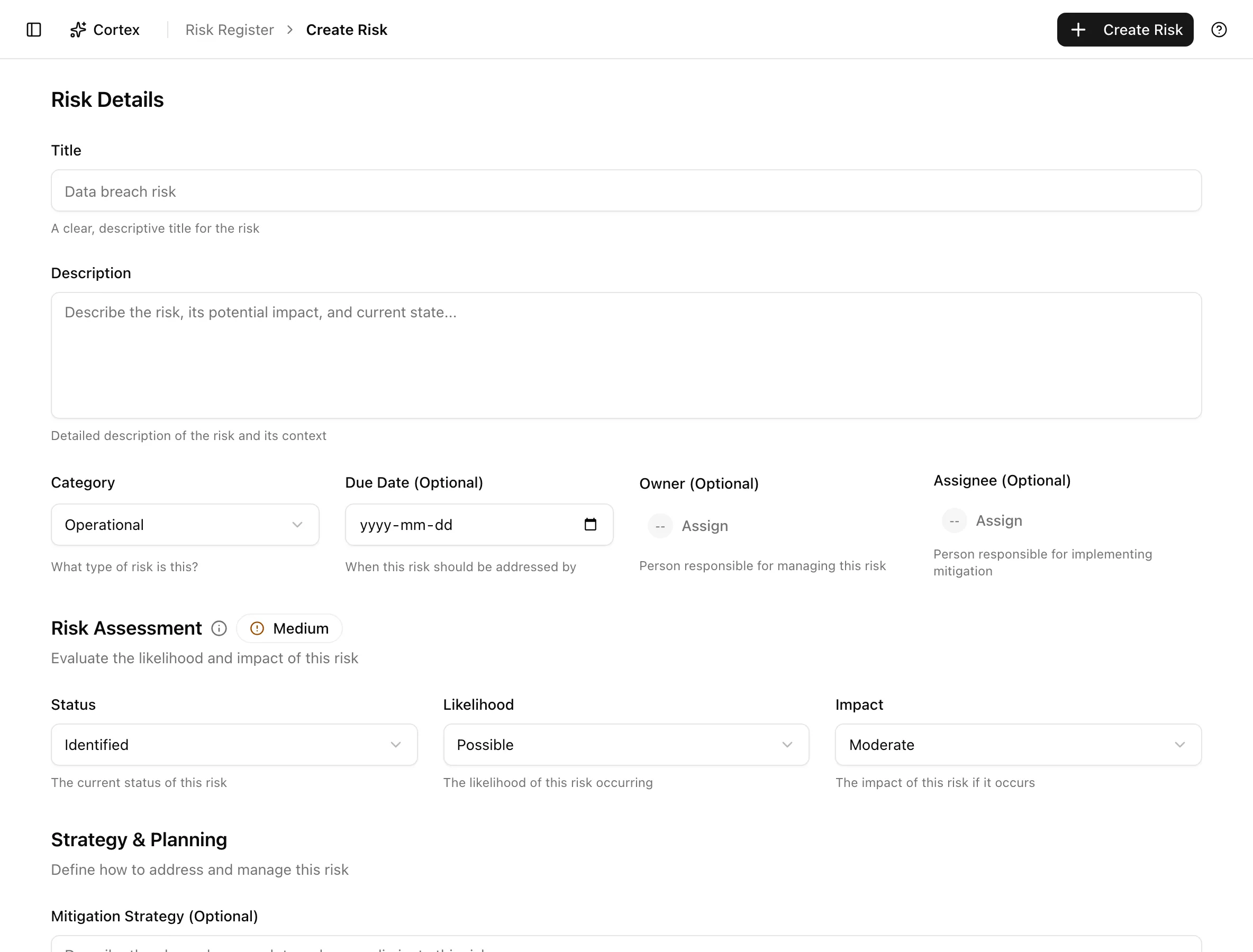
The quick-create dialog on the register captures a title and four chips. The full create page and the detail page are where a risk becomes useful: an owner and assignee, a due date, departments, a mitigation strategy and contingency plan, a treatment plan with post-treatment scores, and links to controls, an asset, policies, and findings. AI can draft treatment suggestions for you; scoring stays manual.
Where to find it
Risk ManagementRisk RegisterAdd riskThe full form lives at /risk/register/create; clicking any row in the
register opens /risk/register/[id].
Key actions
Create a risk with the full form
/risk/register/create. The breadcrumb reads New risk and the form area Risk Details.Department chips are IT, Security, Finance, HR, Legal, Operations, Sales, Marketing, Customer Support, Executive, Procurement, Compliance, Risk Management, and Internal Audit.
Generate treatment suggestions with AI
Add a treatment manually
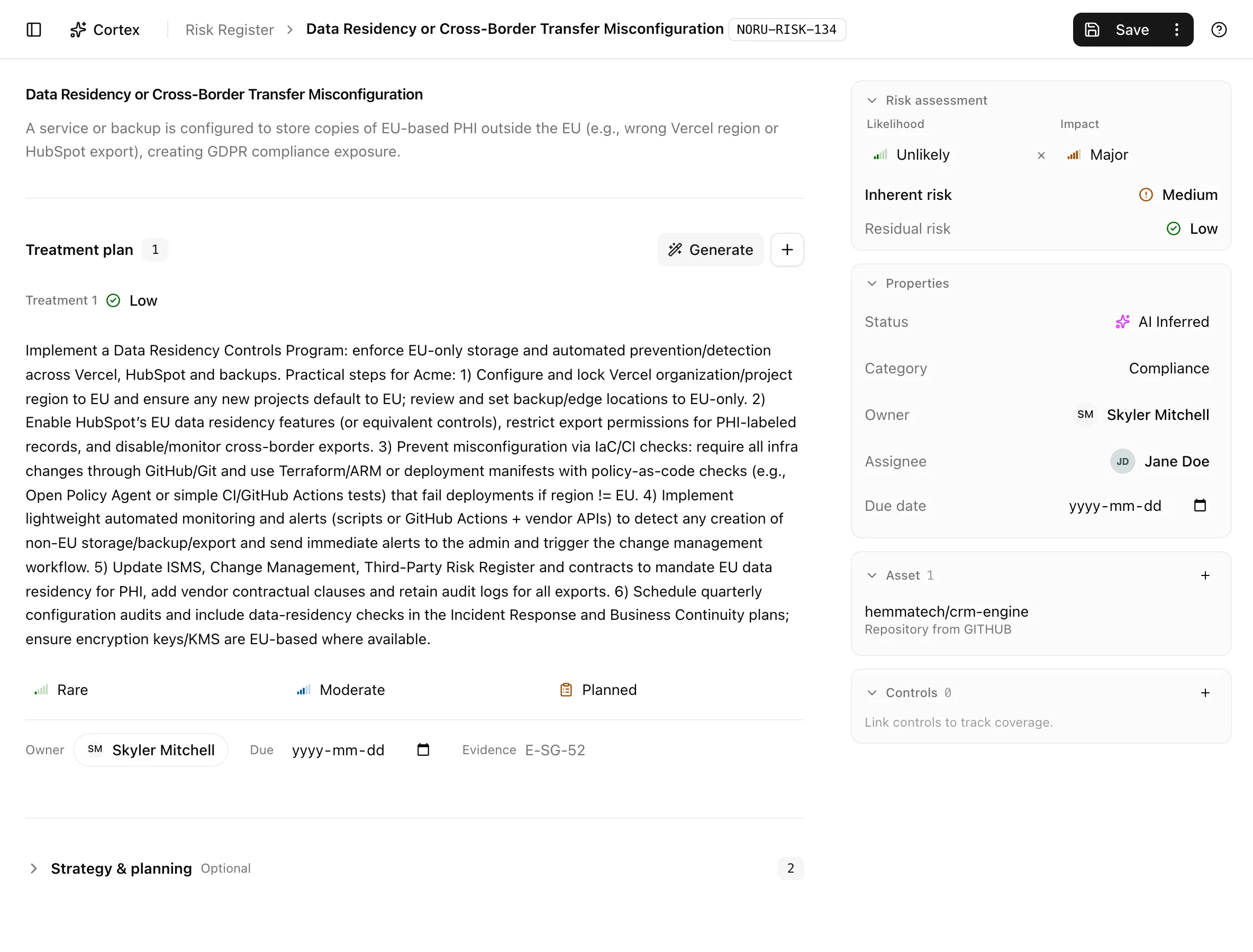
Each treatment row has Action, Post-Treatment Likelihood, Post-Treatment Impact, Owner, Due Date, Status, and Evidence Requirement ID (Optional) ("e.g., E-SG-52"). The evidence id ties the treatment to the evidence item an auditor will ask for.
Record the residual assessment
Residual risk is not a field you type. It is derived from the treatments: fill in post-treatment likelihood and impact on each one and the residual level updates. Leaving them empty applies a flat reduction, which is rarely what you mean.
Link controls, an asset, policies, and findings
| Relationship | Where |
|---|---|
| Controls | Controls panel ("Link controls to track coverage.") |
| Asset | Asset panel ("Link an asset from the register."); one asset per risk |
| Policies | Policies panel |
| Findings | From a finding: Link Risk to Finding, or bulk Link Findings to Risk on the findings list |
On the detail page the title and description edit inline, Risk assessment holds Likelihood and Impact, and Properties holds Status, Category, Owner, Assignee, and Due date. The treatments list starts empty ("No treatments yet. Generate suggestions or add one manually."); each entry shows its action, Likelihood, Impact, Status, and evidence id.
Delete a risk
Click Delete risk in the header and confirm in the Delete Risk dialog. Treatments go with it; linked findings, controls, and the asset are not deleted.
Statuses and fields
| Field | What to enter |
|---|---|
| Title, Description | A scenario, not a category: "Laptop with customer data lost in transit", not "Data loss" |
| Status | Where the risk is in its life; see the register |
| Likelihood, Impact | The inherent assessment, before treatments |
| Owner, Assignee | Accountable member and the person doing the work |
| Due Date | When the treatment plan should be complete |
| Mitigation Strategy | What you will do to reduce likelihood or impact |
| Contingency Plan | What you will do if it happens anyway |
| Departments | Who is affected; used for filtering and reporting |
Treatment statuses:
| Status | Meaning | Set by |
|---|---|---|
Plannedplanned | Agreed, not started. | You |
In Progressin_progress | Being implemented. | You |
Completedcompleted | Done; evidence should exist. | You |
Cancelledcancelled | Dropped; it still counts toward the residual calculation. | You |
Tips and gotchas
Write titles as scenarios with a cause and a consequence. Generated treatments are only as good as the description they read, and auditors read the title first.
Generated treatments are suggestions drafted from the risk text and your organization context. They are not scored, not validated against your controls, and not saved until you save the risk. Review every one.
Create first, link second. Controls, the asset, and policies can only be attached once the risk has an id, which is why the create page shows the "create the risk first" notice under Linked Controls.
What Noru does not do
There is no AI-assisted scoring. Likelihood and impact are whatever a person entered; AI only drafts treatment text. Noru does not chase treatment owners or move a treatment to Completed when its due date passes, and it does not verify that the evidence id you typed exists. Change history is recorded but there is no history panel on this page; read it through the MCP server if you need it.
Related
Last updated on