

Tasks
Work assigned through policies, risks, evidence, controls, vendors, and treatments.
What it is
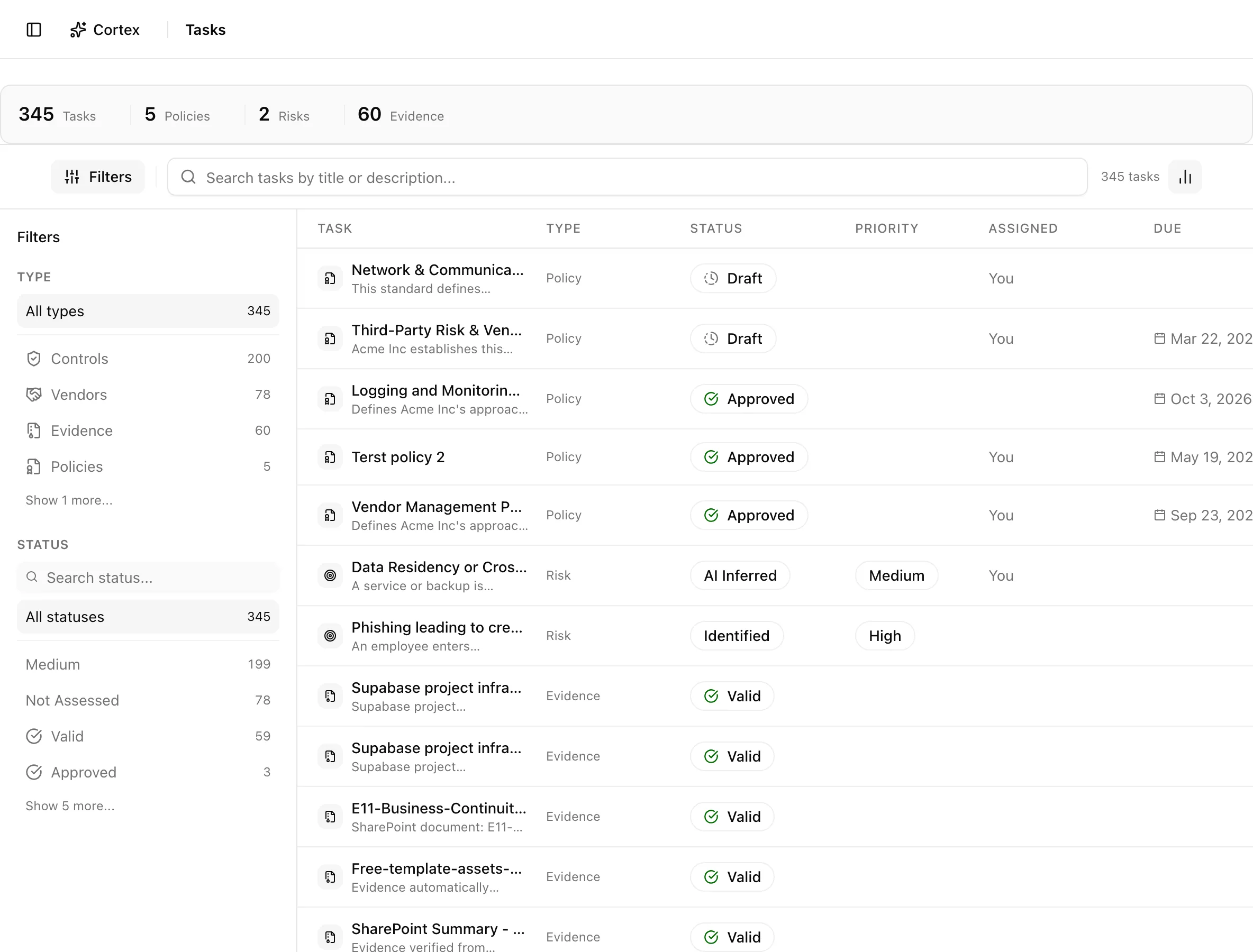
Tasks is your personal work list. It is not a separate to-do table: it is built on the fly from records where you are the owner, assignee, or approver. Policies awaiting your review, risks you own, evidence assigned to you, controls you implement, vendors you manage, and risk treatments with your name on them all appear in one place. Change the assignment on the record and the task moves with it.
Where to find it
SidebarTasksYou can also open it from the user menu at the bottom of the sidebar, under Tasks.
Key actions
Find what is due
Filters and search are stored in the URL as type, status, and search,
so the browser Back button restores them and a filtered view can be shared.
Get a task
There is no create button. A task appears when someone sets you as owner, assignee, or approver on a record. Assigning an owner also sends an in-app notification to that person.
Finish a task
Open the record and do the work there: approve the policy, update the risk, upload the evidence, mark the control implemented, or close the treatment. The task disappears once you are no longer the responsible person, or stays with its new status if you still are.
Statuses and fields
| Column | What it shows |
|---|---|
| Task | The record title and description |
| Type | Policy, Risk, Evidence, Control, Vendor, or Treatment |
| Status | The record's own status |
| Priority | Risk level where the type has one |
| Assigned | "You" |
| Due | The record's due or review date |
| Actions | View |
| Type | You appear when | Due date comes from |
|---|---|---|
| Policies | You are assignee, approver, or the owner's personnel record is linked to your account | Review date |
| Risks | You are owner or assignee | Due date |
| Evidence | You are assignee | Due date |
| Controls | You own the implementation | None |
| Vendors | You are owner or assignee | None |
| Treatments | You are the treatment owner | Due date |
Each type contributes at most 200 rows.
Tips and gotchas
Turn on the Tasks email under Your account to get a morning digest. It goes out once each morning and lists tasks assigned to you in the previous 24 hours.
Control rows are labelled a little differently: the Status column shows the control's priority and the Priority column shows its risk level.
Review reminders on policies are not tasks by themselves. A policy shows up because you are its assignee, approver, or owner, and the review date is just its due date.
What Noru does not do
Noru does not create tasks from control gaps, failed syncs, or findings automatically; those show on their own pages. It does not let you reassign from the Tasks page, add ad-hoc tasks, or mark a task done without changing the underlying record. The daily email covers only newly assigned work, not everything that is overdue.
Related
Last updated on